Getting verified on Hara is one of the quickest ways to unlock higher trading limits and enjoy a smoother trading experience.
It helps keep every Hara account secure while ensuring payments go to the right person. Also, it determines how much you can withdraw. The higher your verification level, the higher your limits.
In this guide, you'll learn what each Hara verification level unlocks and tips to get verified successfully on your first try.
Key Takeaways
- Hara has three verification levels. Complete all three to unlock the highest trading and withdrawal limits.
- Upload clear, high-quality documents with all details visible and ensure your name matches your Hara account exactly.
- For Level 3, your proof of address must be less than three months old.
- If your verification is rejected, check the reason, correct the issue and try again or contact Hara Support if you need help.
How Hara’s Verification Levels Work
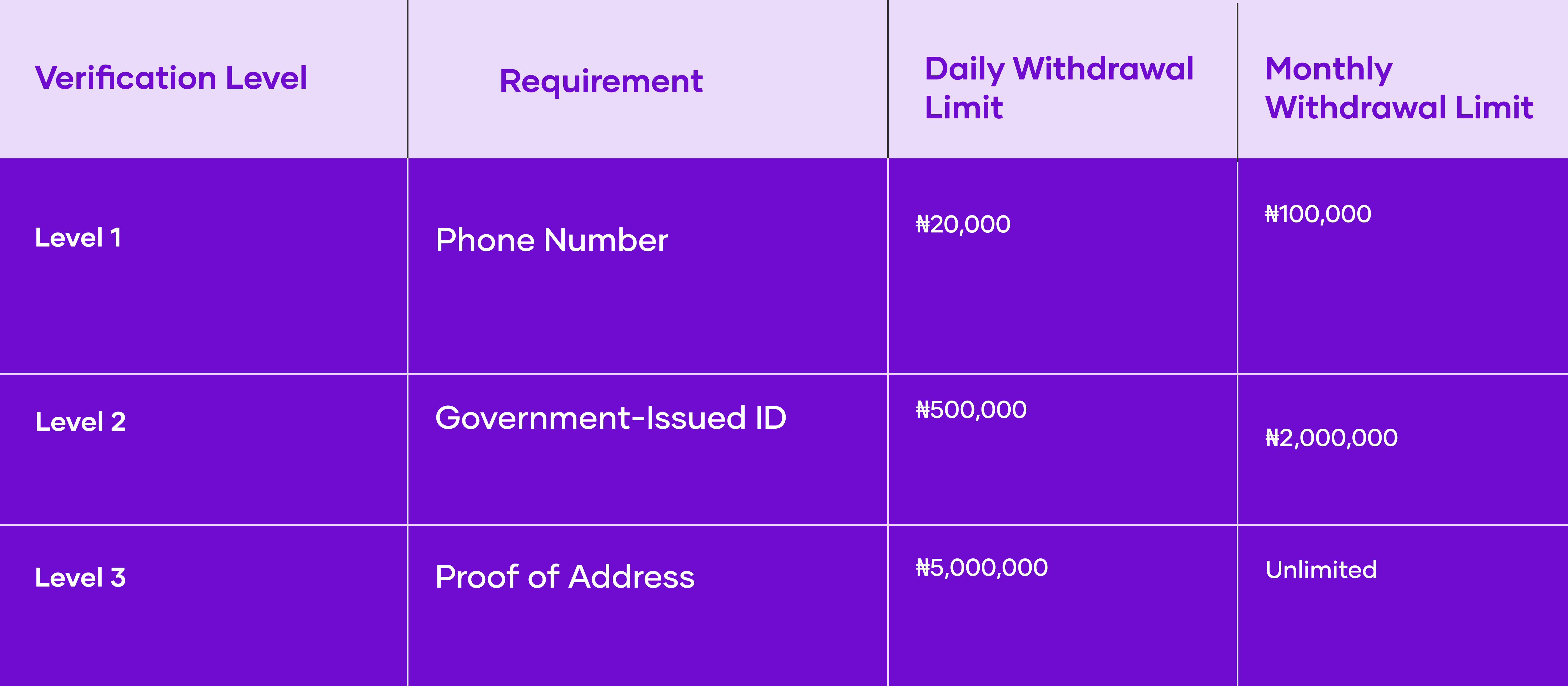
Level 1: Verify Your Phone Number
This is the first step after creating your account. This confirms your phone number for all transactions.
Level 2: Verify Your Identity
Level 2 confirms your identity and significantly increases your trading and withdrawal limits.
Accepted Documents
- National ID Card
- Driver's Licence
- International Passport
Before You Submit
To avoid delays, make sure:
- Your name matches your Hara account exactly.
- Your ID is clear and easy to read.
- All four corners of the document are visible.
Estimated review time: 3–5 minutes.
Common Reasons for Rejection
- The name on your ID doesn't match your Hara account.
- The image is blurry, cropped or difficult to read.
- Parts of the document are missing.
After submitting, your verification may show as Pending while it's being reviewed. Wait for the confirmation email or push notification before assuming the process is complete. If you haven't received an update after 10 minutes, check your spam folder before contacting support.
Level 3: Verify Your Address
Level 3 unlocks Hara's highest withdrawal limits and removes your monthly withdrawal cap.
Accepted Documents
- Electricity bill
- Water bill
- Bank statement
Digital bank statements are accepted as long as they're clear, complete and show your full name and residential address.
Before You Submit
Your document must:
- Be issued within the last 3 months
- Show your full name
- Show your residential address
- Match the details on your Hara account
Estimated review time: 1–2 hours.
Common Reasons for Rejection
- The document is older than three months.
- Your address doesn't match your Hara account.
- Your name doesn't match your account details.
- The document isn't clear enough to review.
If your rejection email references a different document from the one you submitted, don't upload another document immediately. Contact Hara Support through the in-app chat so the team can confirm the exact issue before you try again.
What to Do If Your Verification Is Rejected
If your verification isn't approved:
- Read the rejection email carefully.
- Correct the issue highlighted in the email.
- Submit a new document if necessary.
- If the reason isn't clear, contact Hara Support through the in-app chat.
Note: Submitting the same document again without fixing the issue will likely result in another rejection.
Need Help?
If you're having trouble completing your verification, our Customer Support Team is ready to help. Simply open the Hara app, tap the Chat icon, and let us know what's stopping you. We'll guide you through the process and help you get verified as quickly as possible.